
pcf-events
/pcf-events
Define and handle custom events in PCF components Triggers on: **/*.{ts,tsx,js,json,xml,pcfproj,csproj}
- Author
- pingqLIN ↗
- Repository
- skill-0 ↗
- Licence
- MIT
- Last repository change
- 18.07.2026
Assessment and security
- Files in this package
- 1
- Scripts
- 0
- HTML comments
- 0
- URLs in SKILL.md
- 7
No signals detected. Repository changed on 18.07.2026, without references to retired models or APIs.
MIT, open: use and modify while retaining author attribution.
What it does and when to use it
Define and handle custom events in PCF components Triggers on: **/*.{ts,tsx,js,json,xml,pcfproj,csproj}
Original author description
Define and handle custom events in PCF components Triggers on: **/*.{ts,tsx,js,json,xml,pcfproj,csproj}
How it works
- Component Data Flow
- Using Events
- Defining an Event for Model-Driven Apps
- Defining an Event for Canvas Apps
- Calling an Event
- Next Steps
SKILL.md preview
---
name: pcf-events
description: Define and handle custom events in PCF components Triggers on: **/*.{ts,tsx,js,json,xml,pcfproj,csproj}
triggers: "**/*.{ts,tsx,js,json,xml,pcfproj,csproj}"
globs: "**/*.{ts,tsx,js,json,xml,pcfproj,csproj}"
---
# Define Events (Preview)
[This topic is pre-release documentation and is subject to change.]
A common requirement when building custom components with the Power Apps Component Framework is the ability to react to events generated within the control. These events can be invoked either due to user interaction or programmatically via code. For example, an application can have a code component that lets a user build a product bundle. This component can also raise an event which could show product information in another area of the application.
## Component Data Flow
The common data flow for a code component is data flowing from the hosting application into the control as inputs and updated data flowing out of the control to the hosting form or page. This diagram shows the standard pattern of data flow for a typical PCF component:
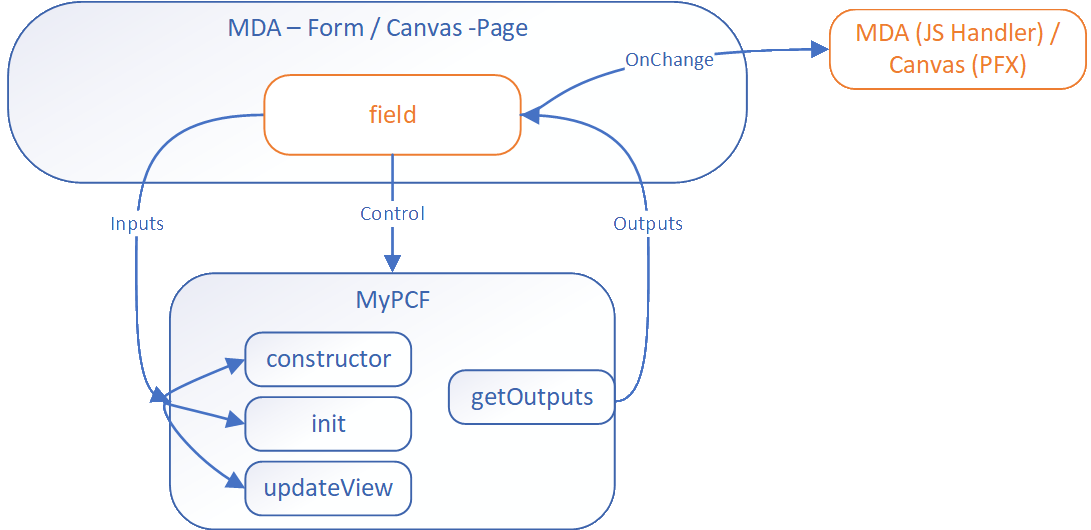
The data update from the code component to the bound field triggers the `OnChange` event. For most component scenarios, this is enough and makers just add a handler to trigger subsequent actions. However, a more complicated control might require events to be raised that aren't field updates. The event mechanism allows code components to define events that have separate event handlers.
## Using Events
The event mechanism in PCF is based on the standard event model in JavaScript. The component can define events in the manifest file and raise these events in the code. The hosting application can listen to these events and react to them.
### Define Events in Manifest
The component defines events using the [event element](https://learn.microsoft.com/en-us/power-apps/developer/component-framework/manifest-schema-reference/event) in the manifest file. This data allows the respective hosting application to react to events in different ways.
```xml
<property
name="sampleProperty"
display-name-key="Property_Display_Key"
description-key="Property_Desc_Key"
of-type="SingleLine.Text"
usage="bound"
required="true"
/>
<event
name="customEvent1"
display-name-key="customEvent1"
description-key="customEvent1"
/>
<event
name="customEvent2"
display-name-key="customEvent2"
description-key="customEvent2"
/>
```
### Canvas Apps Event Handling
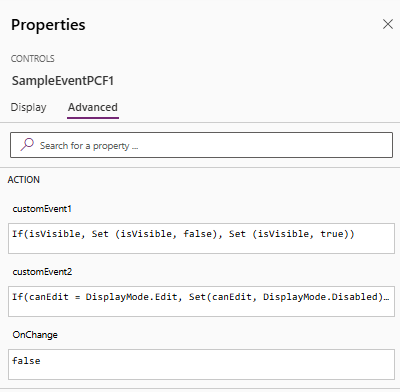
Canvas apps react to the event using Power Fx expressions:
### Model-Driven Apps Event Handling
Model Driven Apps use the [addEventHandler method](https://learn.microsoft.com/en-us/power-apps/developer/model-driven-apps/clientapi/reference/controls/addeventhandler) to associate event handlers to custom events for a component.
```javascript
const controlName1 = "cr116_personid";
this.onLoad = function (executionContext) {
const formContext = executionContext.getFormContext();
const sampleControl1 = formContext.getControl(controlName1);
sampleControl1.addEventHandler("customEvent1", this.onSampleControl1CustomEvent1);
sampleControl1.addEventHandler("customEvent2", this.onSampleControl1CustomEvent2);
}
```
> **Note**: These events occur separately for each instance of the code component in the app.
## Defining an Event for Model-Driven Apps
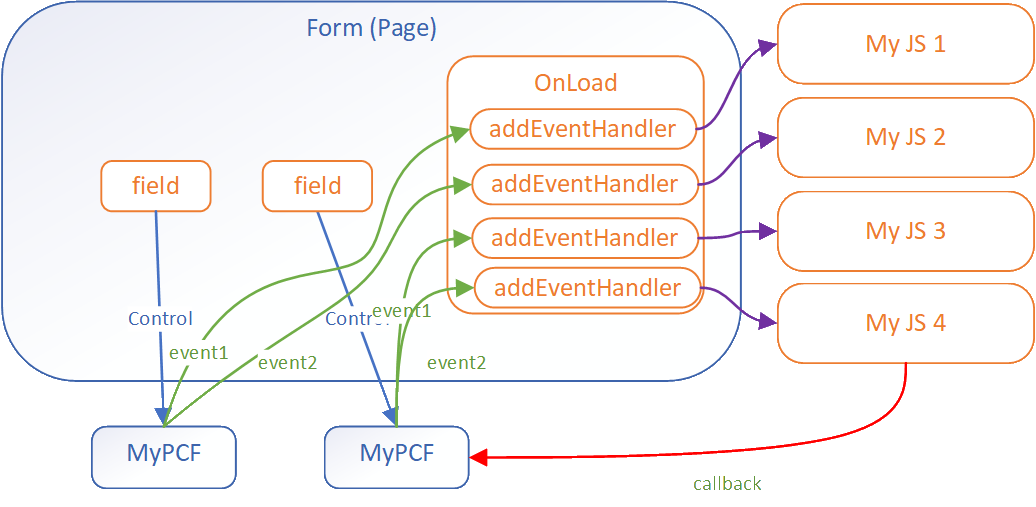
For model-driven apps you can pass a payload with the event allowing for more complex scenarios. For example in the diagram below the component passes a callback function in the event allowing the script handling to call back to the component.
```javascript
this.onSampleControl1CustomEvent1 = function (params) {
//alert(`SampleControl1 Custom Event 1: ${params}`);
alert(`SampleControl1 Custom Event 1`);
}.bind(this);
this.onSampleControl2CustomEvent2 = function (params) {
alert(`SampleControl2 Custom Event 2: ${params.message}`);
// prevent the default action for the event
params.callBackFunction();
}
```
## Defining an Event for Canvas Apps
Makers configure an event using Power Fx on the PCF control in the properties pane.
## Calling an Event
See how to call an event in [Events](https://learn.microsoft.com/en-us/power-apps/developer/component-framework/reference/events).
## Next Steps
[Tutorial: Define a custom event in a component](https://learn.microsoft.com/en-us/power-apps/developer/component-framework/tutorial-define-event)
Versions
The database has no other skills named pcf-events.
Database snapshot: 13.11.2026 · package version b284ec866154 (SHA-256 digest of the entire package)
Downloads in the last 30 days: 2 · ranking
Report a problem with this skill: harmful content, incorrect descriptions or an author’s removal request.
Similar skills
- 90pcf-tooling
Get Microsoft Power Platform CLI tooling for Power Apps Component Framework Triggers on: **/*.{ts,tsx,js,json,xml,pcfproj,csproj} - 100pcf-code-components
Understanding code components structure and implementation Triggers on: **/*.{ts,tsx,js,json,xml,pcfproj,csproj} - 90pcf-and-web-resources
Use for the client-side surfaces of a model-driven app - Power Apps component framework (PCF) controls, web resources (JS/HTML/CSS/XML/image), client form scripts, and Power Fx formula review. Covers scaffolding a PCF control, binding it to a form control, building/deploying via… - 100pcf
Builds, tests, diagnoses, upgrades, deploys and verifies Power Apps component framework (PCF) code components for model-driven apps and Power Pages — field and dataset controls, standard and virtual (React) — from Microsoft-maintained templates and recipes pinned to a tested… - 100pcf-controls
Use when building, deploying, or using PowerApps Component Framework (PCF) controls. Covers field controls and dataset controls, React virtual controls, control lifecycle, manifest configuration, solution packaging, and deployment. Triggers on: "pcf", "custom control",… - 100pcf-conventions
Apply Powercademy's PCF judgement before building, deploying or debugging a Power Apps component framework (PCF) code component - whichever tool builds it - starting with whether PCF is even the right tool. Holds the decision gate (out-of-the-box, canvas component or generative…