
meltflex-embed
/meltflex-embed
Put the MeltFlex AI design tool on the user's own website as an iframe (website embed). Use when the user wants visitors of their site, shop or product pages to design a room from a photo, or to place the shop's own products in their room, without a MeltFlex account. Covers creating the embed in the builder, pasting the code into HTML, React / Next.js, Vue, Shopify, WordPress and Webflow, opening it with a product on product pages, and fixing a blank frame. No API key needed.
- Author
- meltflexdevs ↗
- Repository
- skills ↗
- Licence
- MIT
- Last repository change
- 20.10.2026
Assessment and security
- Files in this package
- 1
- Scripts
- 0
- HTML comments
- 0
- URLs in SKILL.md
- 23
No signals detected. Repository changed on 20.10.2026, without references to retired models or APIs.
MIT, open: use and modify while retaining author attribution.
What it does and when to use it
Put the MeltFlex AI design tool on the user's own website as an iframe (website embed). Use when the user wants visitors of their site, shop or product pages to design a room from a photo, or to place the shop's own products in their room, without a MeltFlex account. Covers creating the embed in the builder, pasting the code into HTML, React / Next.js, Vue, Shopify, WordPress and Webflow, opening it with a product on product pages, and fixing a blank frame. No API key needed.
Original author description
Put the MeltFlex AI design tool on the user's own website as an iframe (website embed). Use when the user wants visitors of their site, shop or product pages to design a room from a photo, or to place the shop's own products in their room, without a MeltFlex account. Covers creating the embed in the builder, pasting the code into HTML, React / Next.js, Vue, Shopify, WordPress and Webflow, opening it with a product on product pages, and fixing a blank frame. No API key needed.
How it works
- 1. The user creates the embed in the builder
- 1b. Or build it over the API (API key)
- 2. Put the code on the site
- 3. Product pages (shop embeds)
- 4. Check that it works
- Troubleshooting
- What the owner gets
- Behavior expected of the agent
SKILL.md preview
---
name: meltflex-embed
description: Put the MeltFlex AI design tool on the user's own website as an iframe (website embed). Use when the user wants visitors of their site, shop or product pages to design a room from a photo, or to place the shop's own products in their room, without a MeltFlex account. Covers creating the embed in the builder, pasting the code into HTML, React / Next.js, Vue, Shopify, WordPress and Webflow, opening it with a product on product pages, and fixing a blank frame. No API key needed.
---
# MeltFlex — Website embed
A website embed is one `<iframe>` that puts a MeltFlex design tool on the user's own site, with their logo, colour and language. Visitors upload a photo of their room and get a design on that page. They need no account; each design costs the site owner **10 credits**.
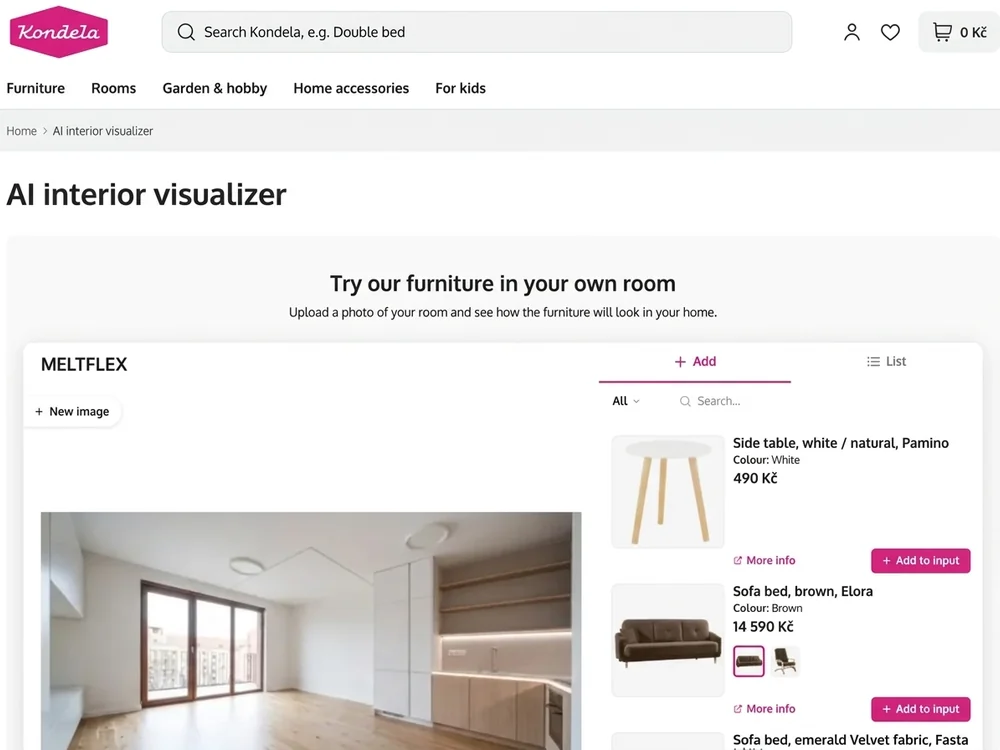
Usually the user builds the embed once in the browser, and your job is to put the code in the right place and check that it loads. If they have an API key (any paid plan) you can also build it for them and load their products: see section 1b.
| Embed for | What visitors do |
|-----------|------------------|
| **Furniture brands and e-shops** | Pick the shop's own products and see them in a photo of their room |
| **Design studios, real estate** | Restyle a room, or furnish an empty listing, from a photo |
To generate designs from code instead (your own UI, batch jobs), use `/meltflex:design` and `/meltflex:furniture`.
## 1. The user creates the embed in the builder
Send the user to <https://www.meltflexai.com/embed-builder> → **New embed**. The steps:
1. **Tool**: furniture shop, design studio or real estate.
2. **Website**: the domain(s) the tool may load on, e.g. `yourshop.com` (subdomains included, up to 10). For local development they must also add `localhost`.
3. **Brand**: logo and button colour (read from their site, editable) and the language: English, Spanish, German, French or Portuguese.
4. **Products** (shops only): a product feed link (Google Merchant RSS / Atom, as exported by Shopify, WooCommerce, Shoptet, Magento or Mergado, or a Heureka XML feed; up to 3,000 products, refreshed hourly) and / or up to 60 products added by hand. **Choose products** then hides single products or whole categories.
5. **Code**: **Copy code**.
Building and copying the code is free with any account, and the account's embeds make 10 designs for free. After that visitors see a popup that the site needs an Enterprise plan (<https://www.meltflexai.com/enterprise>); on Enterprise each design uses 10 credits and an empty balance shows a popup to add credits. Ask the user to paste the copied code, or just the `https://widget.meltflexai.com/...` address in it. Never invent an embed ID.
## 1b. Or build it over the API (API key)
When the user has many products and no feed, or wants you to do the setup, use `https://www.meltflexai.com/api/v1/embeds` with `Authorization: Bearer mf_sk_...`. Same fields as the builder:
```bash
curl -X POST https://www.meltflexai.com/api/v1/embeds \
-H "Authorization: Bearer $MELTFLEX_API_KEY" -H "Content-Type: application/json" \
-d '{
"tool": "retailer",
"allowedDomains": ["yourshop.com"],
"language": "en",
"accentColor": "#1f2937",
"logoUrl": "https://yourshop.com/logo.png",
"productFeedUrl": "https://yourshop.com/feed.xml",
"manualProducts": [
{ "name": "Oak sofa", "price": 1299, "currency": "EUR",
"link": "https://yourshop.com/products/oak-sofa",
"image": "https://yourshop.com/img/oak-sofa.jpg", "category": "Sofas" }
]
}'
```
- `GET` lists embeds; `PATCH` with `id` + fields changes one (`manualProducts` replaces the whole list; `enabled: false` pauses); `DELETE` with `id`.
- `tool`: `retailer`, `interior`, `staging`, `kitchen`. `language`: `en`, `es`, `de`, `fr`, `pt`. Up to 10 domains, up to 60 `manualProducts` (use a feed for more).
- Keep products out with `"productFilter": { "hidden": ["<id>"], "hiddenCategories": ["Sofas"] }` (id = the feed's `item_group_id`, else its `id`; hand-added ones are `manual:<id>`). A hidden category also hides products the feed adds to it later. Send the whole filter on each change.
- Images may be any public https URL; MeltFlex keeps a copy. An unreadable image or feed returns `422` with the reason: fix it and retry.
- To collect products from the shop's pages, read each product page for name, price, currency, link and the main photo URL. Never invent prices or photos.
- `link.token` is the embed ID for `https://widget.meltflexai.com/<token>`. Every account gets it. `locked: true` means no Enterprise yet: the embed runs on the free designs (`freeDesignsLeft` on GET), then needs Enterprise.
## 2. Put the code on the site
The code from the builder:
```html
<iframe
src="https://widget.meltflexai.com/YOUR_EMBED_ID"
title="AI Interior Design by MeltFlex"
width="100%"
height="720"
style="border:0;border-radius:12px;max-width:100%;"
allow="clipboard-write"
loading="lazy"
></iframe>
```
Rules that keep it working:
- Keep `src` exactly as copied. Settings (logo, colour, language, products, domains, pause) are changed in the builder and show up without touching the code.
- Give it the **full content width**. On desktop it needs about 1000 px to show the photo and the panel side by side; narrower containers and phones get the mobile layout automatically. Do not put it in a narrow sidebar column.
- `height` is free to change; 720 px is a good default.
- Do not add a `sandbox` attribute, and keep `allow="clipboard-write"`.
- The page must be served over `https` (or from `localhost` when that is on the website list).
### React / Next.js
```tsx
const MELTFLEX_EMBED_URL = 'https://widget.meltflexai.com/YOUR_EMBED_ID';
export function MeltFlexDesigner({ productUrl }: { productUrl?: string }) {
const src = productUrl
? `${MELTFLEX_EMBED_URL}?product=${encodeURIComponent(productUrl)}`
: MELTFLEX_EMBED_URL;
return (
<iframe
src={src}
title="AI Interior Design by MeltFlex"
width="100%"
height={720}
style={{ border: 0, borderRadius: 12, maxWidth: '100%' }}
allow="clipboard-write"
loading="lazy"
/>
);
}
```
### Vue
```vue
<template>
<iframe
:src="src"
title="AI Interior Design by MeltFlex"
width="100%"
height="720"
style="border:0;border-radius:12px;max-width:100%;"
allow="clipboard-write"
loading="lazy"
/>
</template>
<script setup>
import { computed } from 'vue';
const props = defineProps({ productUrl: String });
const base = 'https://widget.meltflexai.com/YOUR_EMBED_ID';
const src = computed(() =>
props.productUrl ? `${base}?product=${encodeURIComponent(props.productUrl)}` : base
);
</script>
```
### Site builders (tell the user where to click)
| Platform | Where the code goes |
|----------|---------------------|
| WordPress | Edit the page → add a **Custom HTML** block → paste → Update |
| Shopify | Theme editor → add a **Custom Liquid** section (or the page's HTML editor) → paste → Save |
| Webflow | Drag an **Embed** element onto the page → paste → Publish |
| Wix | **Not supported**: Wix serves custom code from a different domain than the site, so the domain lock blocks it |
## 3. Product pages (shop embeds)
Add `?product=` with the product page's address and the tool opens with that product ready to place:
```
https://widget.meltflexai.com/YOUR_EMBED_ID?product=https://yourshop.com/products/oak-sofa
```
- The address must be the same product link as in the shop's feed or product list (the `link` field). A product that is not in the catalog is ignored and the tool opens normally.
- It must start with `http://` or `https://`. URL-encode it when you build the address in code.
- Shopify product template: `?product={{ shop.url }}{{ product.url }}`
- WooCommerce (PHP template): `?product=<?php echo rawurlencode( get_permalink() ); ?>`
## 4. Check that it works
```bash
curl -sI "https://widget.meltflexai.com/YOUR_EMBED_ID" | grep -iE "^HTTP|content-security-policy"
```
- `HTTP 200` and a `content-security-policy: frame-ancestors ...` line listing the user's domains → the embed exists; the listed domains are the only sites it loads on.
- `HTTP 404` → the embed ID is wrong or the embed was deleted. Ask the user to copy the code again.
Then open the page in a browser, upload a photo and make one design (10 credits from the owner's account).
## Troubleshooting
| What you see | Cause | Fix |
|--------------|-------|-----|
| Blank frame; console says `Refused to frame ... frame-ancestors` | The page's domain is not on the embed's website list, or the page is served over `http` | Builder → edit the embed → **Website**: add the domain (no `https://`, subdomains are covered). Use `https`. For local work add `localhost` |
| Blank frame; console says the page's own `Content-Security-Policy` blocked the frame | The site's CSP has a `frame-src` / `child-src` / `default-src` that does not include the widget | Add `frame-src https://widget.meltflexai.com` to the site's CSP |
| "Sorry, this service is not available right now" | The owner is out of credits, the Enterprise plan ended, or the embed is paused | The owner tops up, renews or un-pauses it in the builder. Nothing is spent meanwhile |
| A visitor is told they reached the limit | Each visitor gets 10 designs per 24 h; the embed also has a daily limit for all visitors together (default 100) | Builder → raise the daily limit or choose No limit |
| Desktop shows the phone layout | The iframe's container is narrower than about 1000 px | Move it to a full-width section |
| `?product=` opens no product | The address is not the product's `link` in the feed, or is not URL-encoded | Compare it with the feed; encode it |
| Products are missing or old | The feed is read once an hour, up to 3,000 products | Wait for the refresh, or check the feed link in the builder |
## What the owner gets
- **Designs** step in the builder: every design visitors made, before and after, with the prompt and the products used; download as a ZIP with a spreadsheet.
- Everyone added under **Team access** on the Enterprise plan sees and edits the same embeds.
- Failed designs are refunded automatically.
## Behavior expected of the agent
1. Ask for the copied code or widget address first. Do not guess an ID and do not try to create the embed through the API.
2. Find the right page or template in the user's project and put the iframe in a full-width section. Keep the embed address in one constant or config value.
3. If the project sets a Content Security Policy (meta tag, server headers, `next.config.js`, `vercel.json`, `_headers`, nginx), add `frame-src https://widget.meltflexai.com`.
4. Remind the user to add every domain the page runs on (production, staging, `localhost`) to the embed's website list.
5. Tell the user that each visitor design costs them 10 credits and that the daily limit in the builder caps the spend.
Full guide: <https://www.meltflexai.com/api#embed>
Versions
The database has no other skills named meltflex-embed.
Database snapshot: 13.11.2026 · package version 8c8ec6464f78 (SHA-256 digest of the entire package)
Downloads in the last 30 days: 0 · ranking
Report a problem with this skill: harmful content, incorrect descriptions or an author’s removal request.
Similar skills
- 100meltflex-furniture
Place specific real furniture or decor products into a room photo using MeltFlex AI. Use when the user wants exact items (a particular sofa, bed, table, lamp) staged into a room while matching their real colors, materials, and proportions. Companion to /meltflex:design. - 100meltflex-3d
Produce 3D assets with MeltFlex AI. Use when the user wants a downloadable 3D model (GLB) of a furniture piece from one photo; a 3D model or a rendered 3D picture from a 2D floorplan; or an explorable 3D world (Gaussian splat, .spz plus a hosted viewer link) from a room photo or… - 100embed-agent-in-react
Embed a three.ws 3D agent in a React app with the @three-ws/react Agent3D component and drive it through its ref. Use when a React or Next.js page should show or control a three.ws avatar. - 100apps-embed-sdk
Embed ONLYOFFICE Apps (formerly DocSpace) into web apps with the Embed SDK (@onlyoffice/docspace-sdk-js). Use when the user wants to embed an ONLYOFFICE Apps file manager, document editor or viewer, room/file selector dialog, file uploader, forms gallery, AI chat, or personal… - 100webflow
Webflow is a visual website builder with a built-in CMS and hosting, plus a Data API v2 for managing content from code. Use when someone asks to "update Webflow CMS from a script", "sync content to Webflow", "publish a Webflow item", "Webflow webhook", "Webflow API", "connect… - 100webflow-migration-deep-dive
Migrate external or cross-site content into Webflow CMS with schema mapping, staged batches, reconciliation, and controlled publication. Use when moving WordPress, CSV, JSON, or Webflow-to-Webflow content. Trigger with "migrate to Webflow", "bulk import Webflow", or "move Webflow CMS".